IMPORTANT!
Make sure Bluetooth is on on both your computer & the mobile device you have Microsoft Authenticator installed.
Make sure Bluetooth is on on both your computer & the mobile device you have Microsoft Authenticator installed.
Make sure you do not have any VPN apps running on your phone during setup or sign-in with Passkeys.
Firefox is not supported with Passkeys. Only use Microsoft Edge.
If asked, enter your work email address, click Next

Enter your Work email password, click Sign-in

Click "iPhone, iPad or Android device"

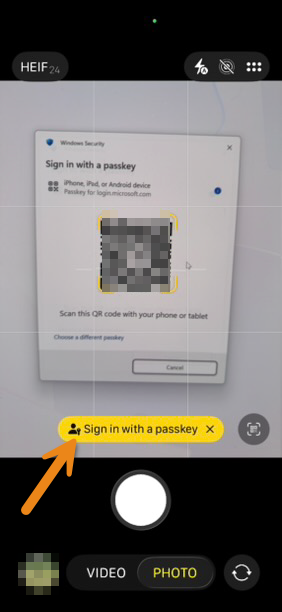
A QR code will show up on the screen. Keep it on screen.

Open the Camera App on your iPhone
Hold your camera preview over the QR code until you see a "Sign in with a passkey"
Click "Use Passkey"